Guide
What a lighting survey report should contain
A lighting survey usually ends up with someone who wasn't there, such as an engineer, a facilities manager or a client. The report has to let them check what was measured, with what, how, in what conditions and against which figure. This guide goes through that list on a specimen Luxwork report.
The result, against each figure
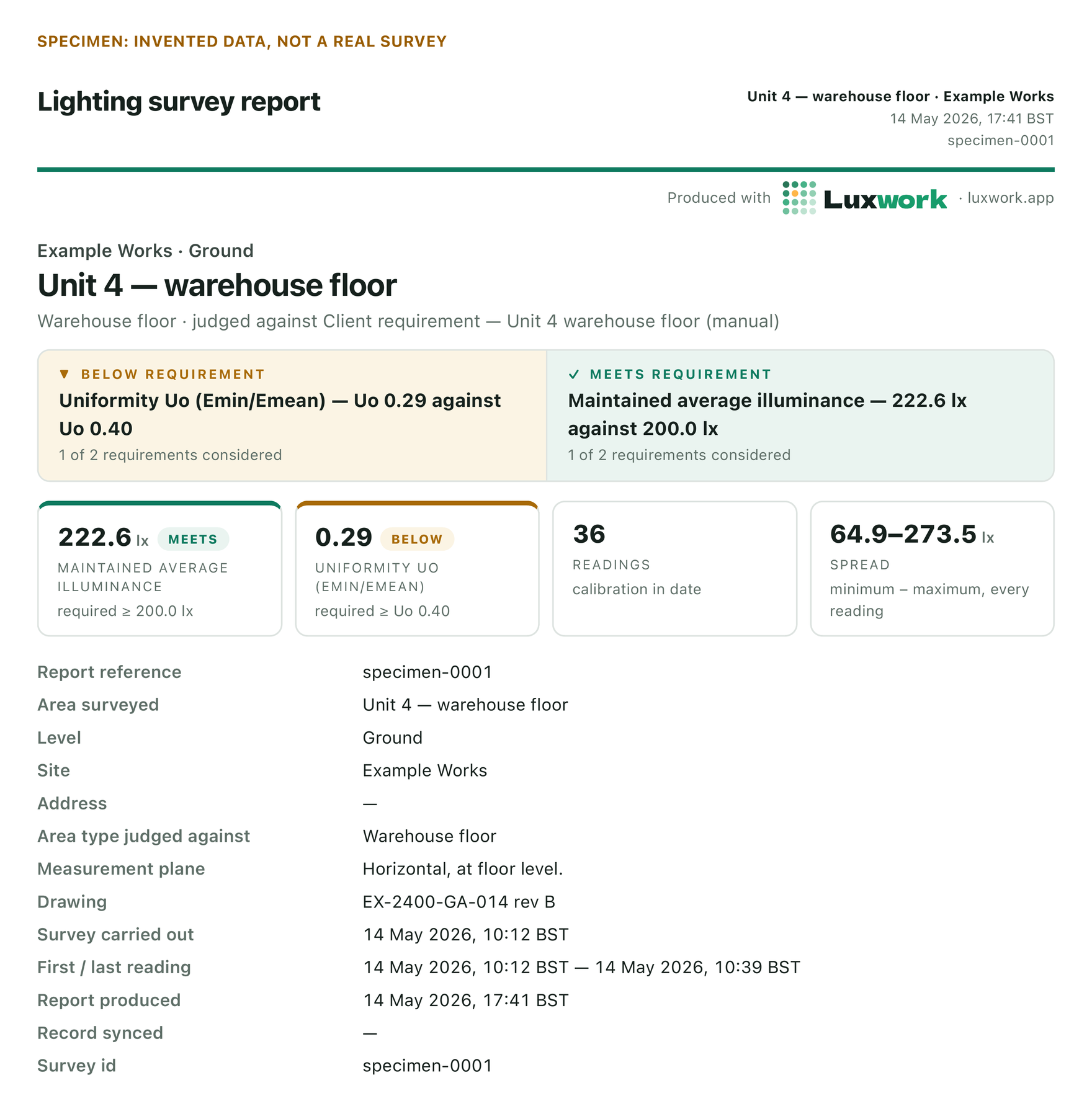
This is the first page of the specimen. Every value on it is invented, and the result is mixed on purpose, because a mixed result is what real surveys usually produce.
Specimen: invented data, not a real survey

- Each figure, with the measured value beside it. Uniformity came in at Uo 0.29 against 0.40 required, which is below. The average came in at 222.6 lux against 200.0 lux, which is at or above. A reader gets both numbers as well as the outcome.
- What it was judged against. The line under the title names the requirement: a client requirement for the warehouse floor, entered by hand.
- The number of readings, and the spread. 36 readings, from 64.9 to 273.5 lux. The readings tile also says the calibration was in date.
- The measurement plane. "Horizontal, at floor level." Without this, nobody can compare the readings with anything.
- When. The survey date, the time of the first and last reading, and when the report was produced, all in local time with the zone named (BST here).
Where the figure came from, and why it matters
Here is a requirement the survey came in below, as the specimen prints it.
Specimen: invented data, not a real survey
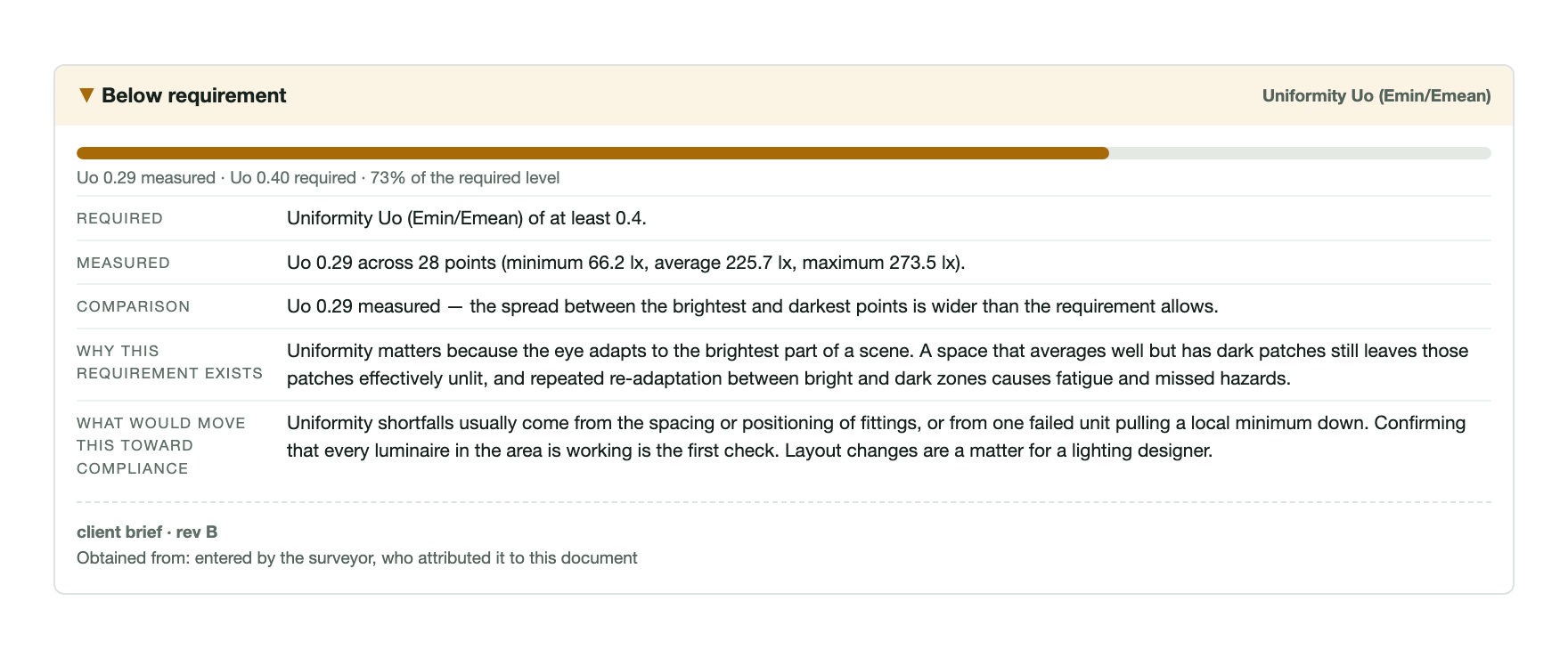
- What was required, and what was measured. The measured line gives the minimum, average and maximum behind the uniformity figure, so a reader can check the arithmetic.
- The comparison, in plain words. "The lowest reading is further below the average than the requirement allows."
- The source of the figure. "Client brief rev B", entered by the surveyor, who said which document it came from. If a reader has a different revision, they can see that at once.
- No pass or fail. The report says the result was below the figure and stops there. Whether that matters is for the reader to decide.
The instrument, and how the readings got in

Specimen data
A real screen from the app, on specimen data. It is what the surveyor sees before signing, and it holds the facts the report prints about the instrument and the grid.
- The instrument. Make, model, serial number and calibration certificate. On the specimen the serial and certificate read SPECIMEN, because they are invented.
- How the values got in. Here they were typed from the meter's display, and the record says so. If a survey mixes typed readings with readings that came over Bluetooth, the report says which were which.
- How the grid was set, and what was assumed. The method, the number of points and the spacing. It also says the mounting height was assumed rather than measured.
- Every reading, with its time. Points that were planned but not measured are counted, not dropped.
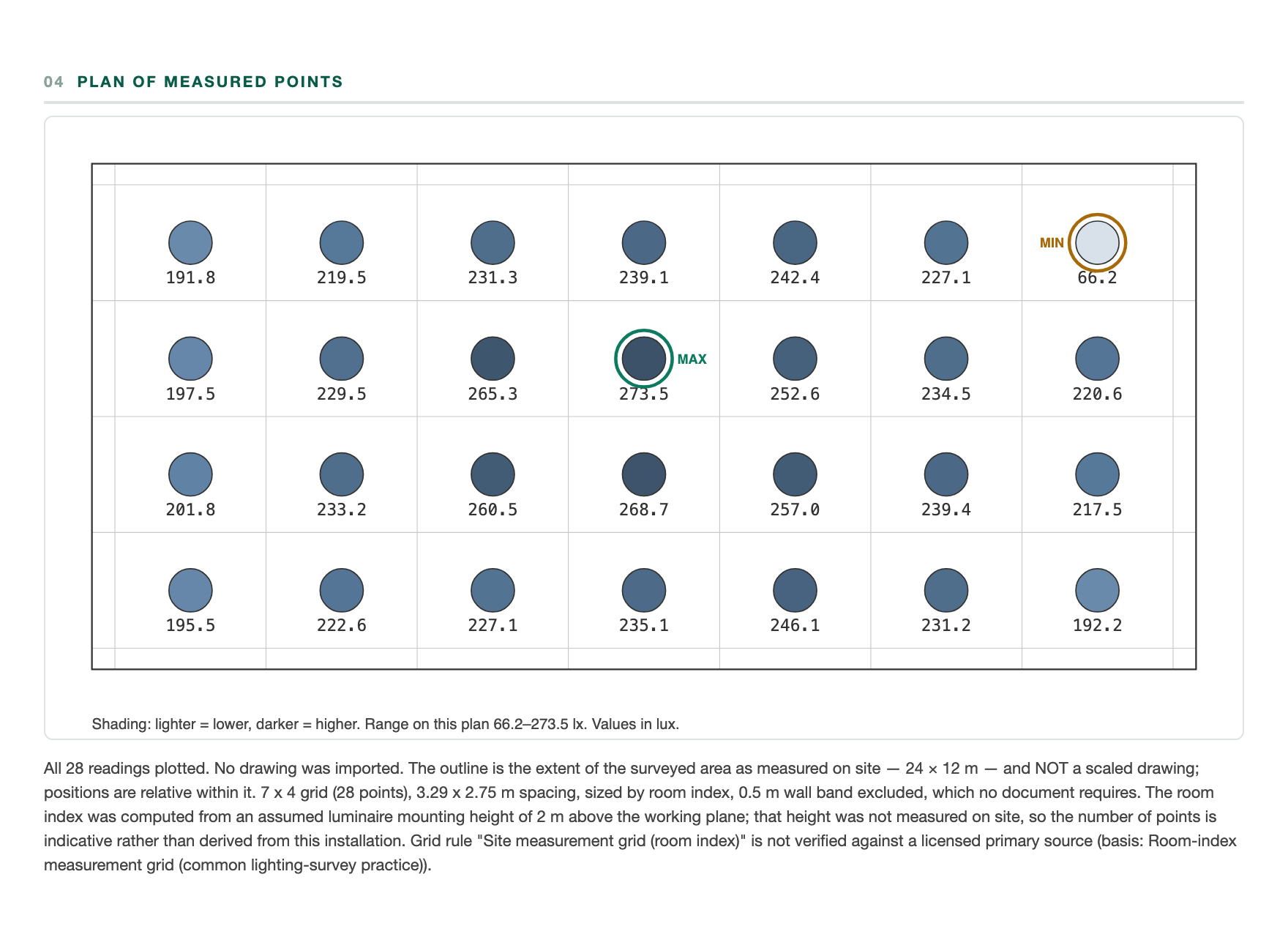
Where each reading was taken
Specimen: invented data, not a real survey

- Each reading at its point. Every value is labelled where it was taken, so a dark corner shows up as a place on the plan.
- The minimum and maximum, ringed and named. They are named in words as well as coloured, so colour is never the only signal.
- The plan's own caveats. The note under the plot says that no drawing was imported, that the outline is the surveyed extent and not a scaled drawing, and that the point count rests on an assumed mounting height.
What the specimen images don't show
Three more things belong in a report. They are in every Luxwork report, but not in the images on this page.
- What was not assessed. Some requirements can't be measured with a lux meter. The report says "not assessed" for them rather than leaving them out, because a missing line reads as "nothing found". If some planned points have no reading, it says how many were measured out of how many were planned, next to the result.
- The conditions before the first reading. Daylight and stray light kept out, lamps run up, every fitting working. Each is recorded as the surveyor's own confirmation. If one didn't hold, the report says so.
- The signature. The report is signed on the device. The last section says when, gives a short fingerprint taken from the signature, and has a square code that carries the signature and the key it was made with. Any change to the signed survey record breaks the signature check. An unsigned draft says it is an unsigned draft.
See the full specimen report: all seven pages, with the PDF to download. Its data is invented, and it is signed with a key made only for the specimen.
Checklist: what to ask for when you receive a survey
Whoever did the survey and whatever they used, these are fair questions to ask of it.
- What was it measured against, and which document and revision did that figure come from?
- Which instrument was used? Serial number, calibration certificate, and was the calibration in date on the day?
- Which light-source setting was the meter on, and does it match the lamps?
- What plane were the readings taken on?
- How was the grid set, how many points were planned, and how many were measured?
- Where was each reading taken? Is there a plan?
- Were daylight and stray light kept out, were the lamps run up, and was every fitting working?
- Were the readings typed in or taken from the meter directly?
- For each figure, are both the measured value and the required value stated?
- Is anything marked as not assessed, and why?
- Who did it, when, and is the survey record signed, so that any change to it breaks the signature check?
The method behind these questions is in how to do a workplace lighting survey.
Luxwork records and signs; it does not certify anything, and it cannot make a survey correct. The report sets out what was measured, with what, in what conditions, and against which stated requirement, so that a competent reader can check the work. The readings come from the surveyor's calibrated meter. Luxwork, a lighting survey app, is launching on iPhone and iPad in autumn 2026. Join the beta list.