Lighting and lux surveys on iPhone and iPad · launching autumn 2026
Lighting survey app. Walk the floor. The report is already written.
Luxwork is a lighting survey app for iPhone and iPad. On a lux survey, it puts each reading from your calibrated meter on the plan where you took it, judges the survey against the rule set you chose, and has the report ready for you to sign when the last point is in.
Beta testing is on iPhone and iPad.
- No account
- Surveys stay on your phone
- Works with the meter you have
Specimen — invented data, not a real survey


A lighting survey, from the first point to the signed report
What a survey looks like with Luxwork in your hand, shown on a demonstration survey with specimen data. Nothing loads until you press play, and it plays from this site. Also on YouTube (opens in a new tab).
- 0:00A survey is two jobs
- 0:41Draw, pair, walk
- 1:25Two requirements, one below
- 1:45What it will not do
- 2:13What it costs
How a survey works in Luxwork
Three steps, and the third one is the point.
1 · Capture
Readings, tied to the instrument
Take readings live over Bluetooth from a supported meter, or type them in from any calibrated instrument. Every reading carries the meter it came from and that meter's calibration record.
2 · Judge
Against the rule set you choose
You pick the rule set at the start — the guidance your client's specification points at, or your own stated requirement, or none at all if you are only recording levels. The measurement pattern, the plane, the preconditions and the criteria come with it.
3 · Report
A record someone can check
Finish the survey and the report already exists: every reading traced to an instrument, the measurement plane stated and the walk recorded. Signed on the device. Any change to the signed survey record breaks the signature check.
Who it's for
- You do the survey. Electrical and M&E contractors, facilities teams and lighting engineers who are asked for lux readings and a report. Bring the calibrated meter you already use. Survey the normal lighting, or the emergency lighting levels with the normal supply off. Which meters connect · How to do a lux survey · How a survey works in Luxwork
- You check the survey. Engineers, facilities managers and asset owners who receive someone else's readings. The report names the instrument and its calibration, the plane, the grid and the conditions. Signed on the device. Any change to the signed survey record breaks the signature check. What an illuminance survey is, and when you need one · What a lighting survey report should contain
What a lighting survey is, and who does one
A lighting survey measures how much light reaches the places where people work. It also goes by lux survey, light level survey or illuminance survey. Someone with a calibrated meter takes readings in lux at evenly spaced points across an area, at the height where the work is done. From those readings come the average, the lowest single reading, and uniformity, which is the lowest reading divided by the average.
Two other jobs go by the same name. An LED or energy survey counts fittings so a supplier can quote for new ones, and an emergency lighting check measures the light with the normal supply switched off. Luxwork is for surveys that measure light levels, including emergency lighting levels.
Who does one
A competent person with a calibrated lux meter. That is usually an electrical or M&E contractor, a lighting engineer, a health and safety consultant, or a trained member of the facilities team. The regulations don't name a qualification, but the person needs to know the method and record enough for someone else to check the work.
When a workplace needs one
The Workplace (Health, Safety and Welfare) Regulations 1992 say that "every workplace shall have suitable and sufficient lighting", and they give no figure in lux. HSE's guidance, HSG38, recommends levels for different kinds of work. That is guidance, not law, and a client's specification or a lighting design may ask for more. A survey records what the lighting delivers, so it can be compared with whichever figure applies.
HSG38 lighting levels, and how to measure against them · Lux levels by area · What an illuminance survey is
How Luxwork does a lighting survey
-
Meter
Your calibrated meter takes every reading, sent over Bluetooth from a supported meter or typed in from the display. Luxwork never uses the phone's light sensor to measure.
-
Grid on the plan
Luxwork lays a grid of points over the area, and each reading lands on the plan where you took it.
-
Rule set
Luxwork judges the survey against the rule set you chose before the first reading: one that ships with the app, your client's own figure, or none if you are only recording levels.
-
Signed PDF report
The report is ready to sign when the last point is in, and it comes out as a PDF. Signed on the device. Any change to the signed survey record breaks the signature check.
Whether the lighting is acceptable stays your call. Luxwork doesn't certify anything.
How to do a lighting survey, step by step · What a lighting survey report should contain
Every reading lands where you took it
The plan is the part a reader checks first.
Luxwork lays the measurement pattern over the area before you start, and each reading is plotted at the point it was taken. The plot shades by level, so a dark corner is visible at a glance — and it states the range it is shaded against, because shading is a comparison and not a verdict. Where the geometry rests on an assumption, the plan says so underneath itself.
Illustration · invented readings
Specimen — invented data, not a real survey
36 readings · 24 × 12 m · larger and stronger = higher (64.9–273.5 lx)
222.6 lux maintained average across 36 readings
Maintained average illuminance
222.6 lx / 200.0 lx required
Uniformity Uo (Emin/Emean)
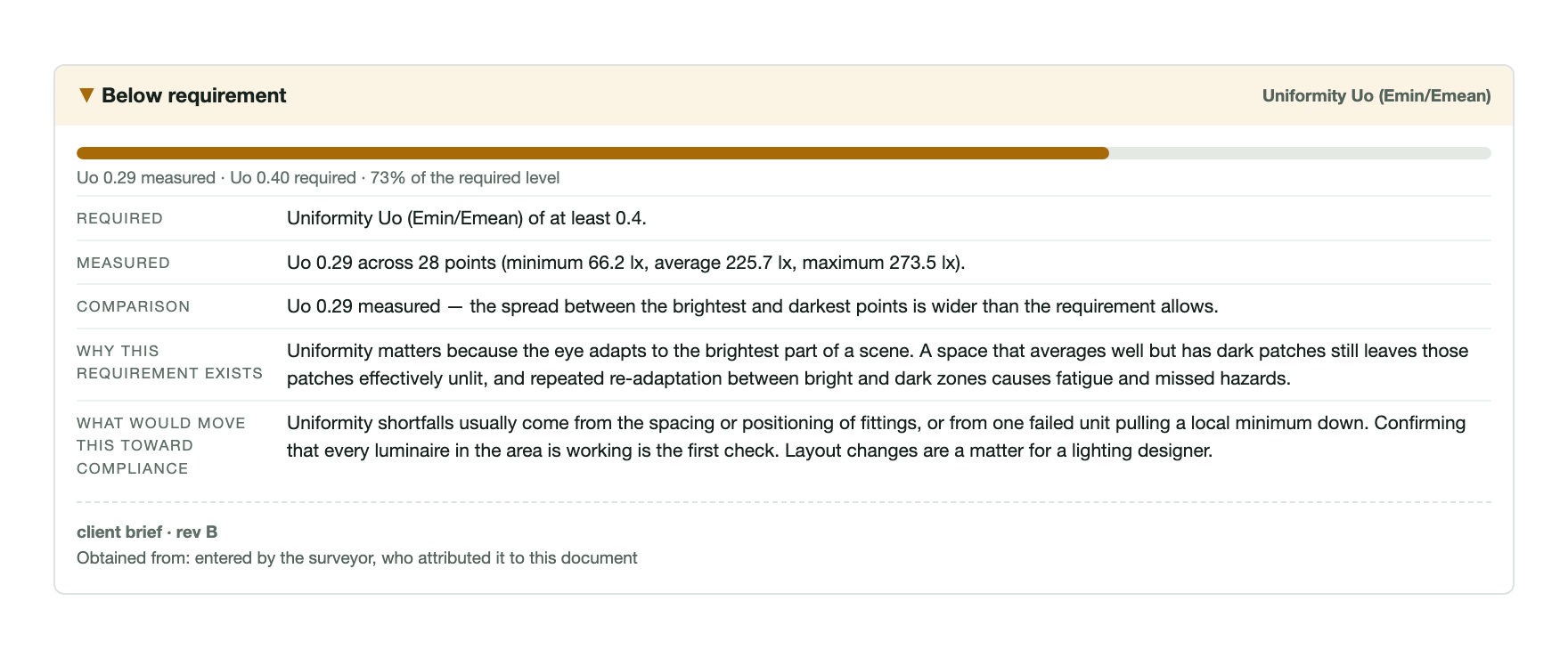
Uo 0.29 / Uo 0.40 required
The same survey, on the phone
Real screens from the app, in the order a survey happens. Scroll sideways for the rest.
-
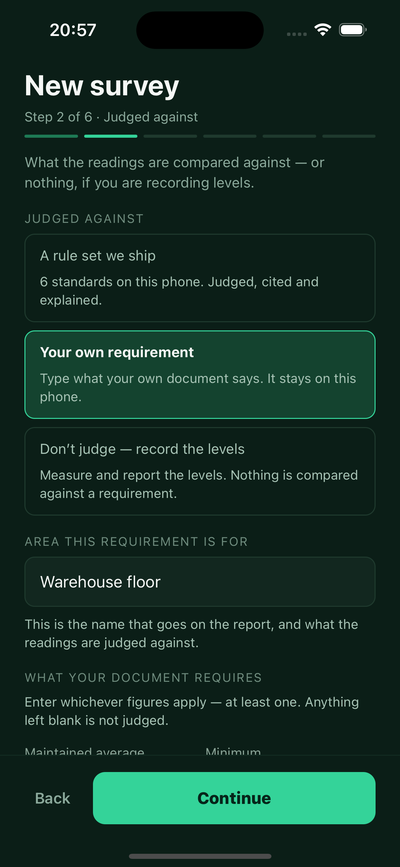
Before you startSay what it is judged against. A rule set, your own stated requirement, or nothing at all if you are only recording levels.
-
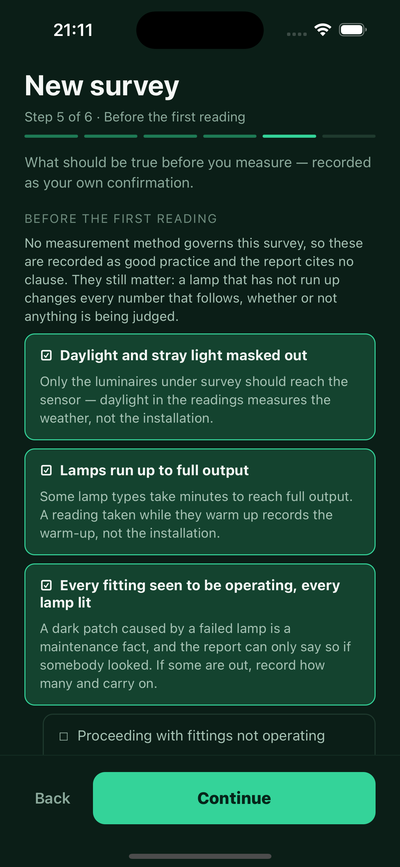
Before the first readingConfirm the conditions. Daylight masked out, lamps run up, every fitting lit. Each is recorded as your own confirmation.
-
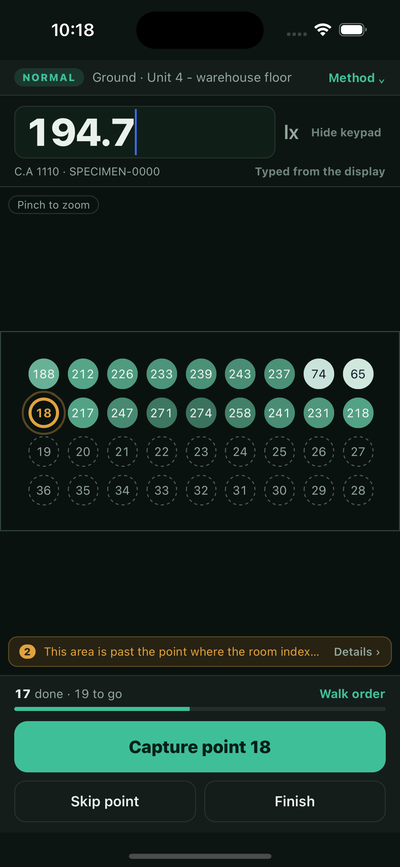
The walk17 done · 19 to go. Each value lands on the point it was taken at, in walk order. Typed from the meter here — over Bluetooth they arrive on their own.
-
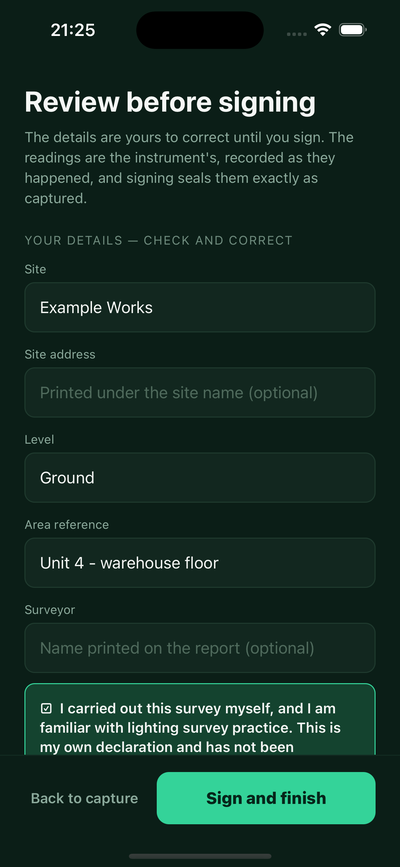
ReviewCorrect the details, not the readings. Site, level and area are yours to fix until you sign. The readings are the instrument's.
-
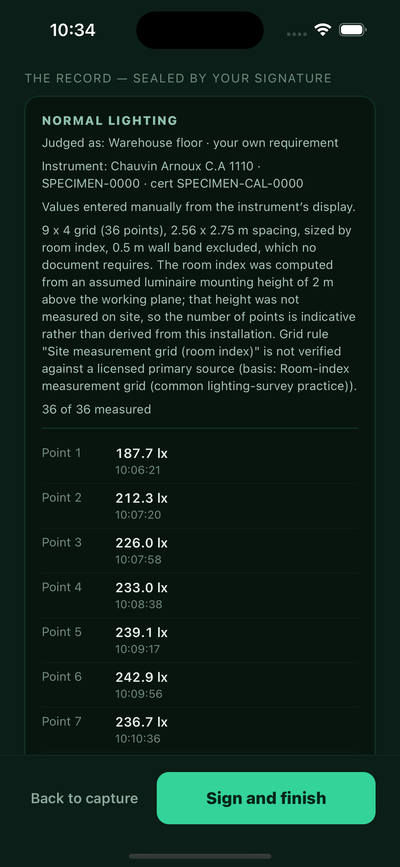
What you signThe record, in full. The instrument and its certificate, how the values got in, how the grid was arrived at — and the mounting height that was assumed rather than measured.
-
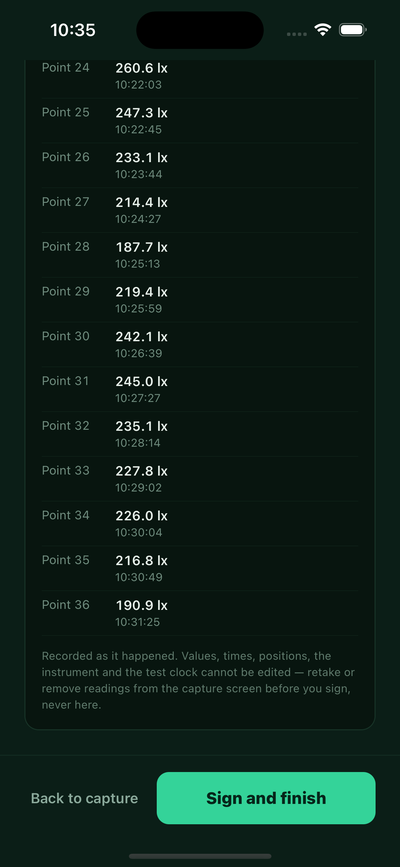
Every readingWith the time it was taken. Values, times, positions and the instrument cannot be edited here — a reading is retaken on the capture screen or it stands.


Specimen — invented data, not a real survey

What it will not do — and why that is the point
A survey is handed to someone who may disagree with it. Luxwork is built for that reader, which means it declines to say things it cannot support:
- It does not stamp pass or fail. It reports what was considered, against what, and leaves the judgement where it belongs.
- It says when something was not assessed. A gap in the readings is printed, not quietly averaged away.
- It prints its own doubts. If a precondition was not met, or a meter's calibration had lapsed, or a compensation setting did not match the light source on site, that goes on the record rather than into a warning nobody sees.
- It does not measure the light itself. The readings come from your calibrated meter. A phone's ambient sensor is not a calibrated instrument, and Luxwork will not pretend otherwise.
Specimen — invented data, not a real survey
Luxwork does not certify anything, does not accredit anyone, and cannot make a survey correct. It records what was measured, with what, under what conditions, and against which stated requirement — so that a competent reader can check the work. The competence stays with the surveyor.
Your surveys stay on your phone
A lighting survey is client work: site names, drawing numbers, area references, sometimes more than that. So Luxwork holds surveys on the device. There is no account to create, no cloud sync, and nothing is uploaded for us to look at. What leaves the phone leaves because you exported it.
The full detail — including what crash reporting does and does not send — is in the privacy notice.
Test it before launch
If you do lighting surveys, you can try Luxwork before its first public release and tell us what needs fixing.
We'll invite testers in small groups through Apple's TestFlight. When we invite you, we'll ask for the email address of your Apple ID.
Testing is on iPhone and iPad.
You're on the beta list.
When we invite you, we'll email you and ask for the email address of your Apple ID.
You also asked for occasional Luxwork emails. Each one has a link to stop them.
We couldn't save your choice about other Luxwork emails, so we won't send them. You're still on the beta list.
That didn't go through, so you're not on the list yet.
Please check the form and try again. If it keeps failing, email support@ubervisor.app and we'll add you by hand.
Availability and contact
Luxwork is being prepared for its first public release. If you survey lighting for a living, or you supply meters to people who do, we would like to hear what you need it to produce.
One address for support, questions and instrument enquiries — see the support page for what to include.